1. The Core Architectural Philosophy
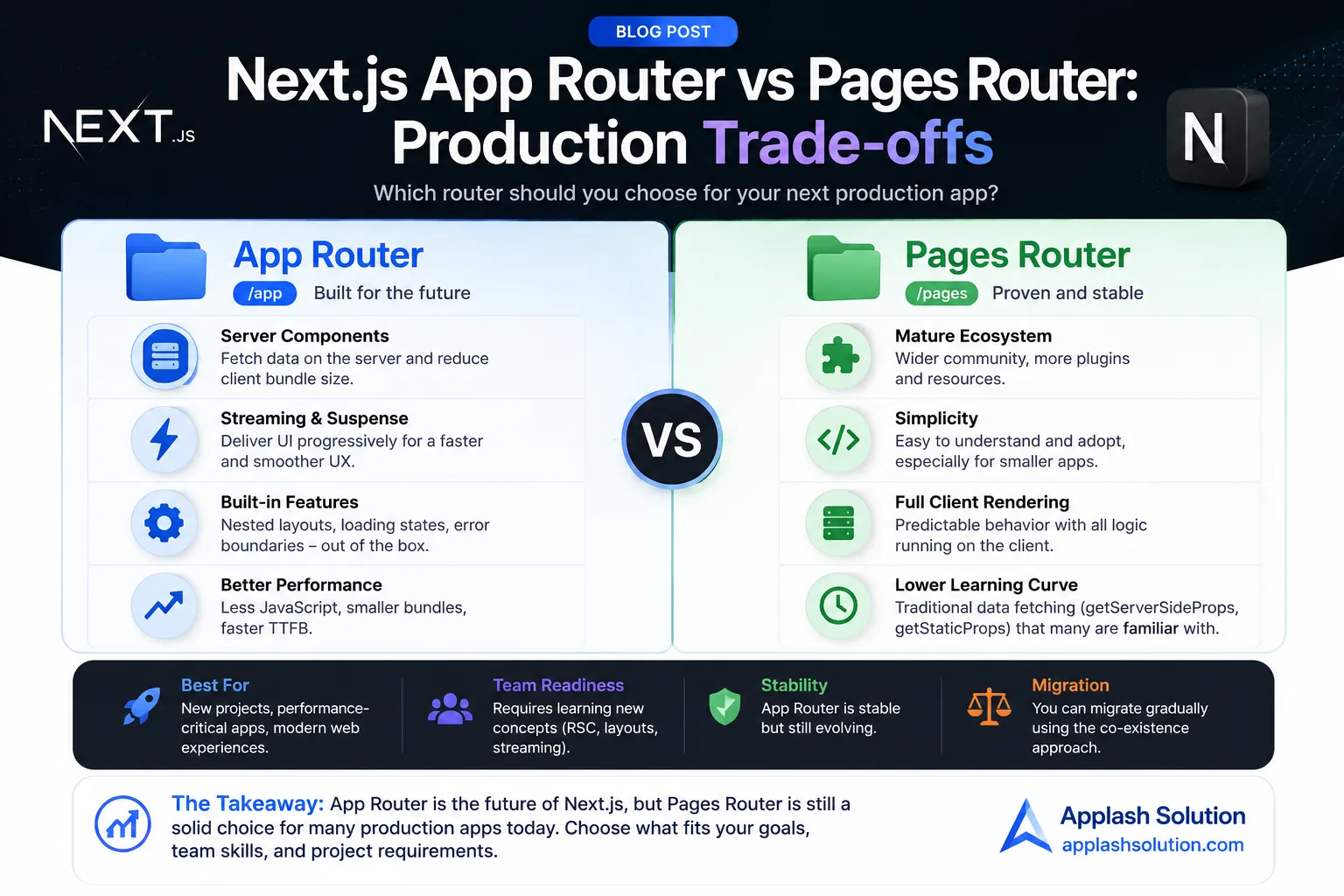
To understand the operational differences, we must first look at how both routing mechanisms handle rendering and state at a fundamental level.
The Pages Router: File-Based Routing via Pages
Introduced at the inception of Next.js, the Pages Router relies on a straightforward file-mapping system inside the pages/ directory. Every file maps directly to a public route.
Data Fetching: Relies entirely on page-level methods such as
getServerSideProps(SSR) orgetStaticProps(SSG).Component Architecture: Every component rendered within a page is inherently a Client Component, meaning it hydrates on the client side and incurs a JavaScript bundle cost.
The App Router: Directory-Based Routing via React Server Components (RSC)
Introduced in Next.js 13 and stabilized in subsequent iterations, the App Router operates inside the app/ directory. It embraces a structural folder-mapping paradigm where folders define routes and specialized files (like page.tsx, layout.tsx, and loading.tsx) define the UI and loading boundaries.
Data Fetching: Uses native
async/awaitdirectly inside components, coupled with standard JavaScriptfetch()syntax that hooks natively into the Next.js extended caching layer.Component Architecture: Every component is a React Server Component (RSC) by default. They execute exclusively on the server, generating raw HTML/JSON with zero client-side JavaScript overhead. Client interactivity is opt-in via the
'use client'directive.
2. Deep-Dive Comparison: Production Metrics
| Architectural Metric | Pages Router (pages/) | App Router (app/) |
| Default Component Type | Client Component (Hydrated) | Server Component (Zero Bundle Cost) |
| Data Fetching Paradigm | Page-level (getServerSideProps) | Component-level (async/await fetch) |
| Routing & Layouts | Monolithic layouts via custom _app.js | Nested layouts without re-rendering |
| Streaming & Suspense | Limited/Complex custom setups | Native, out-of-the-box UI streaming |
| Bundle Size Impact | Scales linearly with page components | Flat/Reduced due to server-only code execution |
3. Production Trade-offs: Making the Strategic Decision
Why Choose the Pages Router for Production Today?
Maturity & Predictability: The Pages Router has been hardened by years of enterprise use. Edge-case bugs are rare, and stack overflow solutions are abundant.
Third-Party Ecosystem Compatibility: Many legacy UI component libraries, state management systems, and tracking scripts still expect a traditional client-side wrapper. If your application depends heavily on extensive third-party charting libraries or complex canvas setups, the Pages Router minimizes configuration friction.
Simpler Mental Model: State management flows linearly from top to bottom (Page -> Context -> Child Components). There is no constant cognitive switching between server-side execution context and client-side hydrations.
Why Choose the App Router for Production Today?
Drastic Performance Gains via Streaming: The App Router natively integrates with React Suspense. You can stream heavy data components directly down the pipe. The shell layout loads instantly while slow database queries render in real-time as they resolve.
Granular Layout Control: Nested layouts allow you to preserve state across page transitions. Sub-navigation areas, sidebars, and dashboard panels do not re-render when changing routes, drastically lowering API traffic and rendering loops.
Optimized Initial Page Load: Because non-interactive parts of your app remain server-side, the initial JavaScript bundle sent to the client is significantly smaller, translating directly to superior page speed metrics.
Work with Applash
Have a process you want to automate?
Tell us how your business works today. A senior person reads every message and replies within one business day.